

Key takeaways
- Duplicate rules stop new duplicates at save time; they never scan, flag, or touch the records already in your org.
- Alert-only rules do nothing during Data Loader or API inserts, which is how a bulk import quietly doubles your contacts.
- Native coverage has hard limits: cross-object matching barely exists, fuzzy matching cannot be tuned, and custom objects get entry-time prevention only.
- Duplicate Jobs can scan existing Account, Contact, and Lead records, but only on Performance or Unlimited Edition.
- Prevention and detection are different jobs: keep the rules guarding the front door, and add a scheduled uniqueness scan to measure the duplicate rate over time.
You turned on duplicate rules for Account, Contact, and Lead. You picked the standard matching rules, set the action to block, and watched a warning appear the next time someone tried to create a second “Acme Corp.” It worked. So why does your pipeline report still show three records for the same buyer, and why did last week’s Data Loader import add four hundred contacts you already had?
Native duplicate management is good at one job and silent about several others. The gap between what it does at the moment of entry and what your org actually looks like is where most duplicate problems live. This post walks through what the native rules genuinely handle, the six places they stop working, and how to deal with the duplicates that are already sitting in your data.
What do Salesforce duplicate rules actually do?
Salesforce duplicate rules run when a user creates or edits a record and compare it against a matching rule that defines which fields to check. When the comparison finds a match, the rule either blocks the save or allows it with an alert, and it can log the match to a report. They stop new duplicates at the point of entry. They do not scan, flag, or touch the records already in your org.
Two pieces work together here, and mixing them up is the first source of confusion. A matching rule decides how two records are compared: which fields, and whether the match is exact or fuzzy. A duplicate rule decides what happens when a matching rule finds something: allow, alert, block, and report. Salesforce ships standard matching rules for Account, Contact, and Lead, and you can build custom matching rules for other fields or objects. The duplicate rule sits on top and enforces the outcome.
At save time this works well. A rep typing “Acme Corp” into a new Account sees the existing record surface before they create a second one. Set to block, the rule refuses the save. Set to alert, it warns and lets the rep decide. For the front door, this is the right tool.
The trouble starts everywhere that is not the front door.
Where native duplicate rules stop working
Here are the six limits teams hit once duplicate rules are live and the duplicate count still climbs.
-
Existing duplicates stay exactly where they are. Duplicate rules fire on create and edit going forward. They never look back. Every pair of records that existed before you switched the rule on is invisible to it. Salesforce Duplicate Jobs can scan existing records, but it runs on Account, Contact, and Lead only and requires Performance or Unlimited Edition. If you are on Enterprise, the existing-record scan is not available to you at all.
-
The API and Data Loader walk around alerts. A duplicate rule set to “allow with alert” has nothing to display during a Data Loader insert or an integration write, because there is no user staring at a screen. Records set to allow flow straight in. Only rules set to block stop an API-driven insert, and many orgs run alert-only rules to avoid blocking their integrations. The result is the classic pattern: rules on, dedup clean in the UI, and a bulk import quietly doubles your contacts.
-
Cross-object matching barely exists. Native duplicate management supports one meaningful cross-object case, comparing new Leads against existing Contacts and the reverse. It does not compare an incoming Contact against your Accounts, or match across your custom objects. If the same person lives as a Lead, a Contact, and a row in a custom
Applicant__cobject, the native rules see three unrelated records. -
Fuzzy matching has a fixed ceiling. Standard matching rules use a defined set of matching methods for names, companies, cities, and streets. You get exact and fuzzy options, but you cannot tune the sensitivity the way a dedicated matching engine allows. “Bob Smith” and “Robert Smith” at the same company can match. “Bob Smith” at “Acme” and “Bob Smith” at “Acme Corporation Inc” often will not, depending on the key. You are working inside a toolbox you cannot extend.
-
Custom objects get uneven coverage. You can write duplicate rules for custom objects, so entry-time prevention is available. The existing-record Duplicate Jobs feature does not cover them. So on a custom object you can block new duplicates but have no native way to find the ones already there, which is the same blind spot as limit one, made worse.
-
Reporting on duplicates is thin. Duplicate Record Sets and Duplicate Record Items give you some visibility into what the rules caught. There is no native org-wide answer to “how many duplicates do I have, on which objects, and is that number going up or down.” Without that measurement you cannot tell whether your dedup effort is winning or losing.
None of these are bugs. Duplicate rules were built to guard the entry point, and they guard it. The problem is that most teams treat them as a complete deduplication strategy, and they are one layer of it.
Native rules versus added tooling: a decision matrix
Use this to see which jobs the native rules cover and which ones need something else. “Added tooling” here means a data quality monitor, a dedicated dedup app, or a scanning process, depending on which gap you are closing.
| Job to be done | Native duplicate rules | Duplicate Jobs (native) | Added tooling |
|---|---|---|---|
| Block a duplicate on UISave | Yes | No | Yes |
| Block a duplicate on API / Data Loader | Only if action is “block” | No | Yes |
| Find duplicates already in the org | No | Account, Contact, Lead only | Any object |
| Cover custom objects end to end | Entry only | No | Yes |
| Cross-object matching beyond Lead / Contact | No | No | Varies |
| Measure a duplicate rate over time | No | No | Yes |
| Merge records automatically | No | No | Rarely, and review it |
The pattern is clear. Native rules own the “prevent at the door” column. Everything in the “find, measure, and cover every object” column needs a process that scans what already exists.
How do you find duplicates that are already in Salesforce?
To find duplicates already in your org, you need a process that scans existing records instead of checking them at save time. Salesforce Duplicate Jobs does this for Account, Contact, and Lead on the higher editions; beyond that you need reporting on Duplicate Record Sets or a data quality tool that measures a uniqueness rate across any object. Native duplicate rules on their own will not surface them, because they only fire on create and edit events.
This is the gap Data Quality Sense (DQS) is built to close. DQS runs a batch uniqueness scan across any SObject you choose, standard or custom, and reports three numbers per field or record set: a uniqueness rate, a distinct count, and a duplicate count. Instead of asking “will this new record collide,” it answers “how many collisions already exist, and where.” You point it at Account, at Contact, at your custom Applicant__c object, and you get a measured answer rather than a hope.
DQS detects and reports. It does not merge, cleanse, or auto-delete anything. That boundary is deliberate. Merging records is a decision about which values survive and which history you keep, and that decision belongs to a person who understands the accounts, not to a background job. What DQS gives you is the visibility to make that decision with evidence: the scale of the problem, the objects it lives on, and whether the number moves after you act.
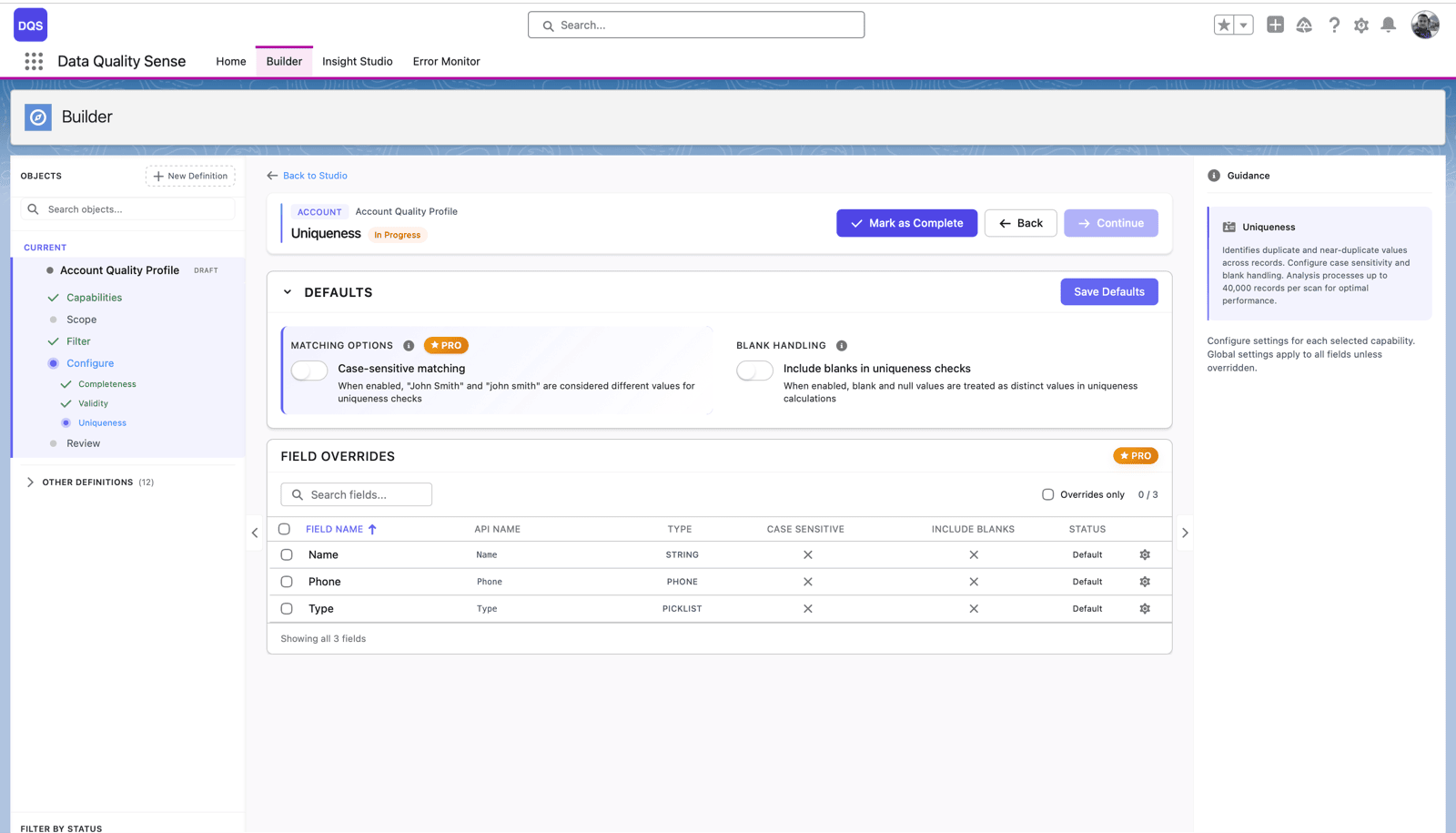
Because the scan is scheduled, you can run it weekly and watch the duplicate count as a trend rather than a one-time cleanup. That closes limit six from the list above: you finally have the org-wide duplicate measurement the native tools never produced. For worked examples of what these scans surface on real objects, see uniqueness scenarios.
A merge workflow that keeps history intact
Finding duplicates is the easy half. Merging them without losing data is where cleanups go wrong. Once a scan hands you the duplicate sets, work through them with a few rules in place.
Decide the survivor by data, not by record age. The oldest record is not automatically the best one. Pick the record with the most complete and current fields as the master, and confirm which related records, activities, and opportunities move with it. Salesforce’s native merge for Account, Contact, and Lead preserves child records and lets you choose the winning field values, so use it rather than deleting and re-creating, which strips history. Merge in small, reviewed batches instead of one giant pass, and re-run the uniqueness scan afterward to confirm the count dropped and no new collisions appeared.
Prevention and detection are two different jobs, and a clean org needs both. Keep the duplicate rules on to guard the front door. Add a scanning process to measure and surface the duplicates the door was never designed to catch. That combination is what turns “we have duplicate rules” into “we know our duplicate rate and it is going down.”

Michał Bajdek
Co-Founder, Data Quality Sense
Salesforce Architect and AppExchange ISV founder focused on optimizing enterprise workflows. Certified System and Identity Architect who previously built Salesforce solutions at Accenture, PwC and IBM’s Waeg.