

Key takeaways
- Clean up Salesforce in five ordered steps over 30 days: baseline scan, quick wins, completeness, duplicate merge, then guardrails.
- Assign one accountable owner and a definition of done per week; a phase with a shared owner is a phase nobody owns.
- Week 0 replaces opinions with numbers: scan the twenty fields that drive decisions, not every field on every object.
- Merging is the highest-risk work, so export affected records before the first merge and keep a log of what combined into what.
- Week 4 makes it last: validation rules, named field owners, and a recurring scan cadence, because a cleanup without guardrails decays within a year.
Most Salesforce cleanup projects never start. They live on a someday list because the org feels too big to touch and nobody agrees on where to begin. So the duplicates pile up, the required fields stay blank, and the pipeline report drifts a little further from reality every quarter.
The fix is not a heroic weekend. It is a scoped, sequenced 30-day plan with one owner per phase and a clear definition of done. You measure first, take the obvious wins, then work through completeness, duplicates, and guardrails in that order. Each week builds on the last, so you never clean something you cannot yet see.
This is the plan. Copy the table, assign the owners, and run it.
How do you clean up Salesforce data?
Clean up Salesforce data in five ordered steps. First, run a baseline scan so you know your real completeness, validity, duplicate, and freshness numbers before you touch anything. Second, take quick wins by removing dead records and fixing obvious picklist and formatting chaos. Third, fill the missing values on the fields that drive revenue and routing. Fourth, find and merge duplicates with an export taken first for rollback safety. Fifth, set guardrails, validation rules, clear ownership, and a monitoring cadence, so the org stays clean after the project ends.
How to use this plan
Each phase in the plan has one accountable owner, a short list of tasks, and a definition of done you can check off. Assign the owners before Week 0 starts. A phase with a shared owner is a phase nobody owns.
The effort estimates are illustrative. They reflect a typical mid-sized org of a few hundred thousand records, and you scale them to your own volume and team. Treat them as planning anchors, not promises. A cleaner org moves faster; a larger or messier one takes longer.
The plan is tool-agnostic. You can run every step with native Salesforce tools, a spreadsheet, and discipline. A scanning tool speeds up the measurement in Week 0 and the monitoring in Week 4, and this plan calls out where. The sequence matters more than the software.
The 30-day plan at a glance
This table is the template. Each row is a week, with the owner and the outcome that marks it done.
| Week | Focus | Owner | What “done” looks like | Typical effort |
|---|---|---|---|---|
| Week 0 | Baseline scan | Salesforce admin | You have a documented score per dimension for the objects and fields that matter, and a written scope for the next four weeks | Half a day to 2 days |
| Week 1 | Quick wins | RevOps / ops lead | Dead records archived, obvious duplicates flagged, picklist values consolidated, formatting standardized on one or two fields | 2 to 4 days |
| Week 2 | Completeness | Data owner per object | Required revenue and routing fields populated above your target on active records, with a backfill plan for the rest | 3 to 5 days |
| Week 3 | Duplicates and merge | Salesforce admin + record owners | Duplicate sets reviewed and merged with an export taken first, history preserved, merge log kept | 3 to 5 days |
| Week 4 | Guardrails | Admin + data governance owner | Validation rules live, field ownership assigned, and a recurring scan cadence scheduled so drift gets caught | 2 to 3 days |
Print it. Put a name in the owner column for each row. That single act is what turns a wish into a project.
Week 0: baseline scan
You cannot clean what you have not measured. Week 0 exists to replace opinions with numbers. Before this week, “our data is bad” is a feeling. After it, you know completeness on Account.Industry is 62 percent and you have a duplicate count in the thousands.
Pick the objects that carry your revenue and operations first: Accounts, Contacts, Leads, Opportunities. For each, list the fields that reports, routing, and any AI feature actually read. A scan of every field on every object produces noise. A scan of the twenty fields that drive decisions produces a plan.
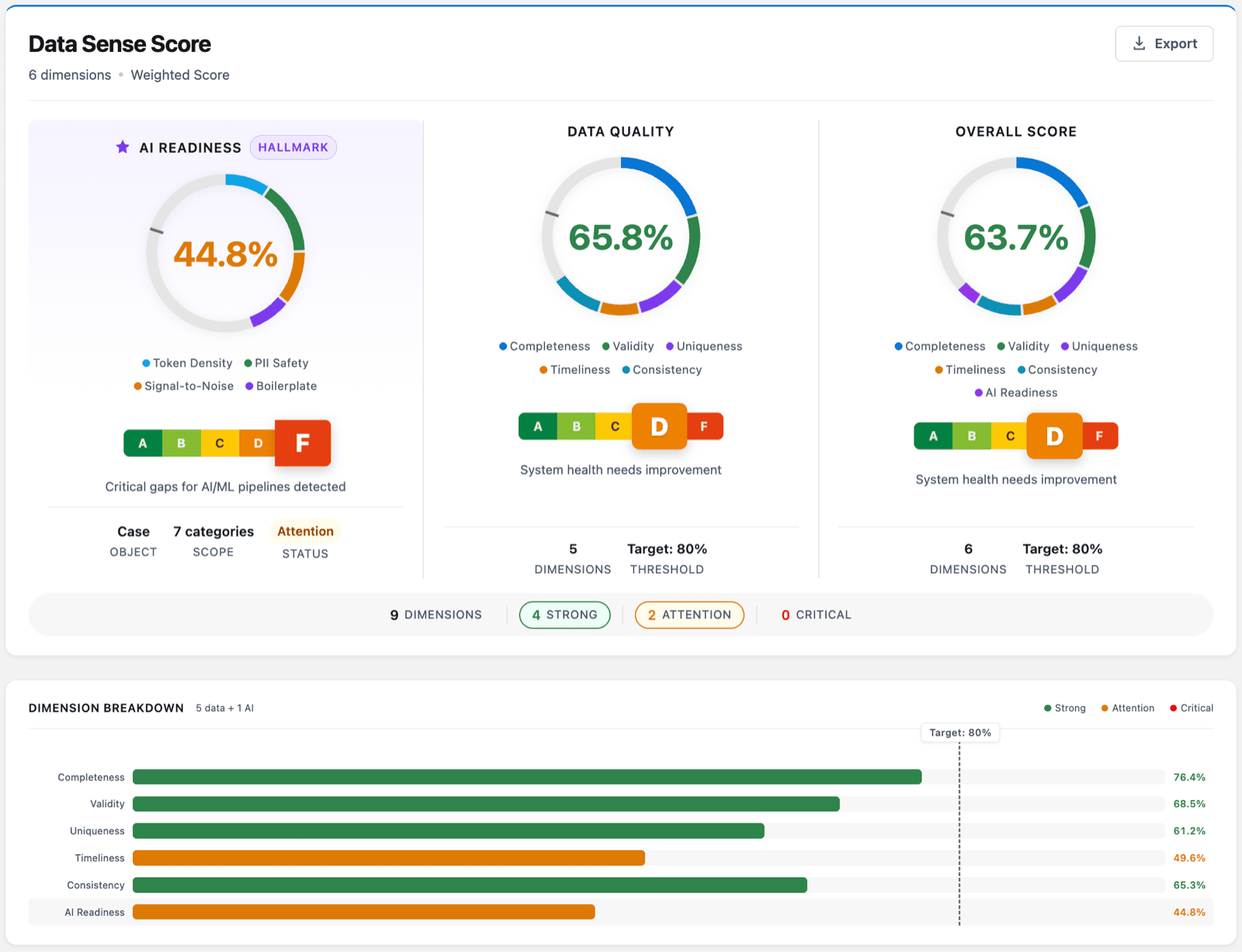
Then measure five things per field: how complete it is, whether the format is valid, how many duplicates exist, how stale the records are, and whether values are consistent against the expected standard. Write the numbers down. This is your baseline, and Week 4 will re-run it to prove the project worked.
This is the audit step where Data Quality Sense fits. You configure a scan in DQS Builder, pick the object and the exact fields, and set a threshold per field. The batch engine runs it on demand or on a schedule, and the result is a score from 0 to 100 broken down by dimension. DQS detects and reports; it does not change your records. The point of Week 0 is visibility, not action.
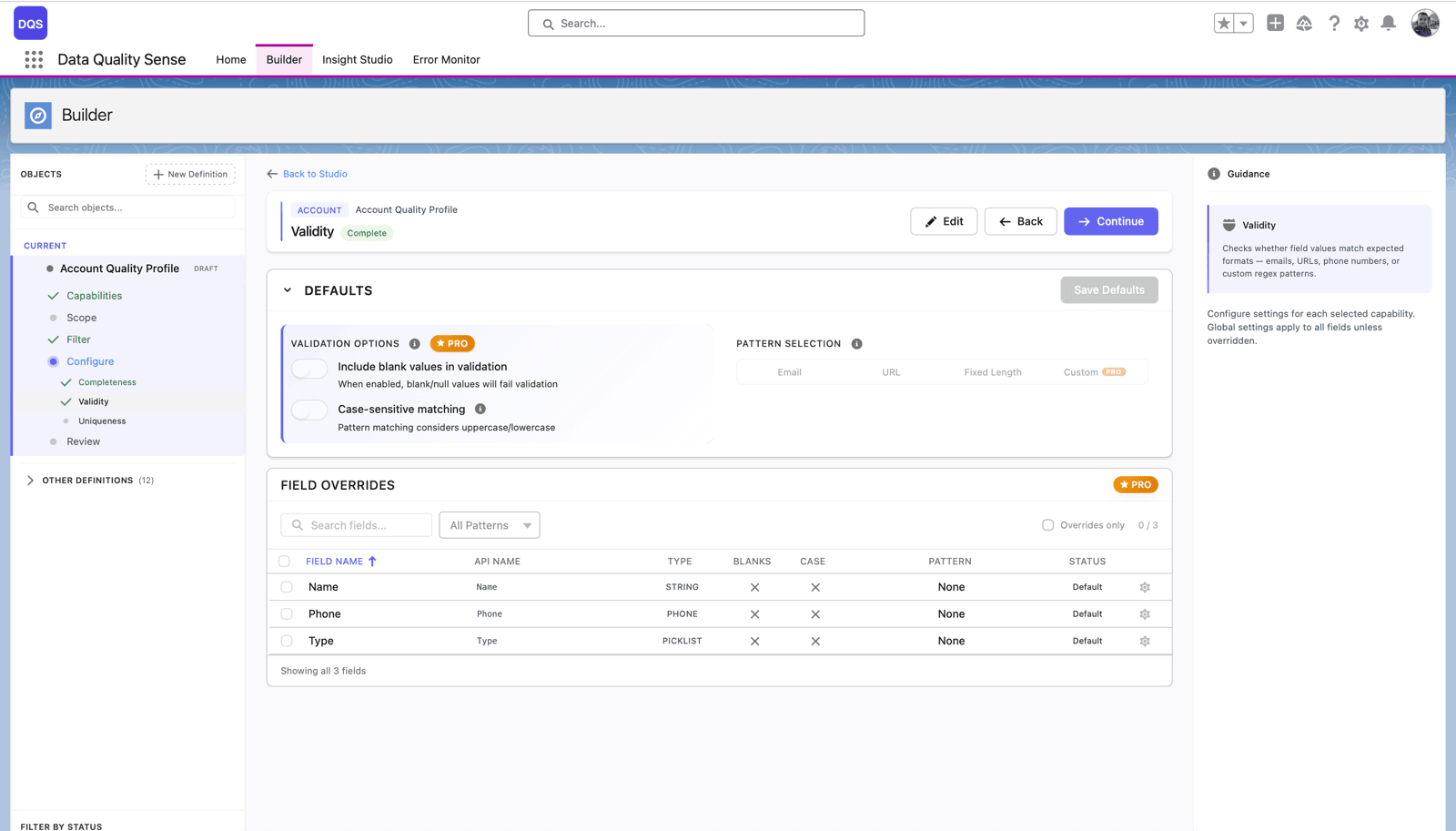
Whatever tool you use, end Week 0 with two artifacts: a documented score per dimension, and a written scope naming the objects, fields, and targets for the next three weeks. Do not skip the writing. The scope is what stops Week 2 from turning into a bottomless field-by-field slog.
Week 1: quick wins
Week 1 builds momentum with changes that are safe, visible, and fast. You are not solving hard cases yet. You are clearing the obvious mess so the harder weeks work on a smaller, cleaner set.
Start with dead records. Find Leads with no activity for years, Accounts with no related contacts or opportunities, and test records left behind by old imports. Archive or delete them following your retention policy. Fewer junk records means every later step runs against a smaller pile.
Next, standardize the picklist chaos. A Country field with “USA,” “US,” “United States,” and “U.S.” breaks every report that groups by it. Consolidate to one value per meaning and update the picklist so the old variants cannot come back. Do the same for State, Industry, and Lead Source.
Then flag the obvious duplicates. You are not merging yet, that is Week 3, you are marking the exact-match pairs so the merge week has a head start. Salesforce duplicate rules catch many of these. Tag them and move on.
By the end of Week 1, the org already feels lighter, and the people watching believe the project is real. That belief is what keeps the owners engaged through the harder middle.
Week 2: completeness on revenue-critical fields
Blank fields are the quietest data problem because nothing errors out. A missing AnnualRevenue does not throw a warning; it just silently drops the account out of the segmentation report and misroutes the lead. Week 2 fills the gaps that cost you money.
Do not try to fill everything. Return to the scope from Week 0 and rank fields by impact. The fields that drive territory assignment, lead scoring, entitlement, and executive reporting come first. A blank Description on an old contact can wait. A blank Industry on an active enterprise account cannot.
Work active records first. Populate the priority fields on the accounts and opportunities that are live in your pipeline, then set a backfill plan for the long tail. For fields you can derive from other data you already hold, batch-update them. For fields that need a human to know the answer, assign the records to the owner who does.
End Week 2 with your priority fields above the completeness target you set in Week 0, on active records, and a written plan for the rest. Completeness is a moving target, so the goal is a defensible line, not perfection.
Week 3: duplicates and merge with rollback safety
Duplicates are the highest-risk cleanup work, because a merge is hard to undo. Week 3 handles them deliberately, with a safety net taken before the first merge, not after the first mistake.
Start by pulling the full duplicate set. Week 1 flagged the exact matches; now include the fuzzy ones, the same company with a trailing “Inc,” the same person with two email addresses. Native duplicate rules and matching rules surface many. Review the sets a human, not a rule, decides which record survives.
Take the export first. Before any merge, export the affected records and their key fields so you can reconstruct them if a merge goes wrong. Run the first batch in a sandbox if the volume is large. This is the rollback safety that makes the week survivable.
Then merge using Salesforce’s native merge, choosing the master record and preserving the related history, activities, opportunities, and cases, so nothing important is orphaned. Keep a merge log of what combined into what. A tool speeds up the finding: a uniqueness scan returns the duplicate count and distinct count, and DQS can raise a Task on each impacted set, with owner assignment, so the right person reviews it. The merge itself stays a human decision, in Salesforce, on purpose.
End Week 3 with the reviewed duplicate sets merged, an export archived, and a log that says exactly what happened. Duplicates that survived review because they were genuinely different get documented so nobody re-flags them next quarter.
Week 4: guardrails so it stays clean
A cleanup without guardrails decays back to where it started within a year. Week 4 is what makes the previous three weeks last. You spent a month getting the numbers up; this week keeps them there.
Set validation rules on the fields that hurt most when they go wrong. Require the revenue and routing fields you filled in Week 2 so they cannot go blank on new records. Enforce format on email and phone. Keep the rule set small: a handful of rules people respect beats fifty they route around.
Assign ownership. Every priority field and object gets a named owner responsible for its quality. Ownership is what turns “someone should fix that” into “that is my job.” Write it down where the team can see it.
Then schedule the monitoring. Re-run the Week 0 baseline scan on a recurring cadence, weekly for duplicates, monthly for completeness, quarterly for freshness, so drift surfaces while it is small. A scheduled scan with a score trend shows the line holding or slipping over time, and turns findings into Tasks and Chatter posts on the impacted records so the owners act before the report breaks. Detection stays automatic; the fixing stays human.

End Week 4 by re-running the full baseline. Put the before and after scores side by side. That comparison is your proof the project worked, and your case for keeping the cadence funded.
Keep the plan going
Thirty days gets you from unknown to measured, clean, and guarded. The org will still drift, because every CRM does. The difference is that now you catch the drift in a weekly scan instead of a quarterly surprise, and you have owners who know it is their job to act.
If you are running this cleanup because an AI or Agentforce rollout is coming, the same sequence applies with a sharper bar. Agents act on individual records, so one stale duplicate becomes one wrong action. For the version scoped to that use case, see Salesforce data cleanup for Agentforce.
Assign the owners, run Week 0 this week, and let the numbers, not opinions, tell you what to fix next.

Artur Kolasa
Co-Founder, Data Quality Sense
Salesforce Certified Technical Architect helping global enterprises turn business goals into scalable Salesforce strategies. A decade of delivery and architecture leadership across Accenture, PwC, IBM’s Waeg and Publicis Sapient.