

Key takeaways
- Annual CRM cleanups fail because data decays continuously; a smaller cleanup that repeats beats a bigger one that happens once.
- Match each check's frequency to its problem: duplicates weekly, completeness and validity monthly, freshness and consistency quarterly, full audit before each planning cycle.
- The principle: the right frequency for any check is slightly faster than the problem it catches.
- Assign every cadence to a role, not a person: admin takes technical checks, sales ops takes revenue-tied checks, reps own entry, RevOps owns the audit.
- Automate the repetitive detection with scheduled scans and save humans for judgment calls; if cleanup feels like a project again, your cadence is too slow.
Most teams treat CRM cleanup like a garage: they let it fill up all year, then block a weekend to fix everything at once. The annual purge feels productive. It also fails, because data does not decay on your schedule. Contacts change jobs in March. Reps fat-finger a phone number in May. A bulk import doubles half your accounts in July. By the time your annual cleanup rolls around, the org is already back where it started.
The fix is not a bigger cleanup. It is a smaller one that repeats. This post gives you a maintenance cadence you can actually keep: which checks belong on a weekly rhythm, which belong monthly, which belong quarterly, and who owns each one.
Why the once-a-year cleanup always fails
Data decay is continuous, so any maintenance schedule slower than the decay itself loses ground. Email addresses go dead when people leave companies. Job titles drift. Phone numbers get reassigned. Company names change after acquisitions. None of this waits for your Q4 project. (For the mechanics of how fast this happens, see the timeliness dimension.)
An annual cleanup has three built-in problems.
First, the backlog is overwhelming. When you only look once a year, you are staring at twelve months of accumulated duplicates, blanks, and stale records. The volume is discouraging, so the work gets rushed or abandoned halfway.
Second, the damage is already done. A duplicate account that sits for ten months has ten months to break routing, split pipeline, and confuse reporting. Finding it in month eleven does not give you those months back.
Third, nobody owns it. A once-a-year project is everybody’s job in theory and nobody’s job in practice. It depends on someone remembering, scheduling, and pushing it through. That person leaves, and the cadence dies with them.
A recurring schedule solves all three. Small batches stay manageable. Problems get caught while they are cheap to fix. And a named owner on a fixed rhythm means the work happens whether or not anyone feels inspired.
How often should CRM data be cleaned?
CRM data should be cleaned on a recurring schedule matched to how fast each type of problem appears, not in a single annual sweep. Check for duplicates weekly, because they are created constantly by imports and manual entry. Check completeness on revenue-critical fields monthly. Check for stale and decaying records quarterly. Run a full audit before each planning cycle. The right frequency for any given check is “slightly faster than the problem it catches.”
That last line is the whole principle. Duplicates appear daily, so you check weekly. Fields go stale over months, so you check monthly. Decay compounds over quarters, so you check quarterly. Match the cadence to the clock the problem runs on, and the backlog never builds.
The CRM cleaning cadence table
Here is the schedule. Treat it as a starting template and adjust the frequencies to your org’s volume and how fast your data actually moves.
| Task | Frequency | Owner | What you are looking for |
|---|---|---|---|
| Duplicate check on Leads, Contacts, Accounts | Weekly | CRM admin | New duplicate records from imports, web forms, and manual entry |
| Completeness on revenue-critical fields | Monthly | Sales ops | Blank email, phone, industry, owner, and stage fields on active records |
| Validity of formatted fields | Monthly | CRM admin | Malformed emails, phone numbers, and URLs that passed entry |
| Freshness and decay | Quarterly | Sales ops | Records with no activity in a set window; likely stale contacts and dead accounts |
| Picklist and formatting consistency | Quarterly | CRM admin | Country, state, industry, and status values that drifted from the standard |
| Ownership and orphaned records | Quarterly | Sales ops + managers | Records owned by inactive users or sitting unassigned |
| Full data audit across dimensions | Before each planning cycle | Data owner / RevOps lead | Baseline health across every field before you forecast or set targets |
A few notes on reading the table.
Revenue-critical fields come first. You do not need every field complete. You need the fields that route leads, drive reports, and feed forecasts to be solid: owner, stage, amount, email, phone, industry. Cleaning a custom field nobody reports on is wasted effort.
Weekly duplicate checks stay small on purpose. A week of new records is a short list. Reviewing and merging it takes minutes. Let that list grow to a year and the same task becomes a dreaded project.
The pre-planning audit is the reset. Before a quarterly business review, an annual planning cycle, or a forecast lock, run a full pass across every dimension. This is the one moment you look at everything, and because the weekly and monthly checks kept the org clean, the audit confirms health instead of uncovering disasters.
How do you maintain CRM hygiene?
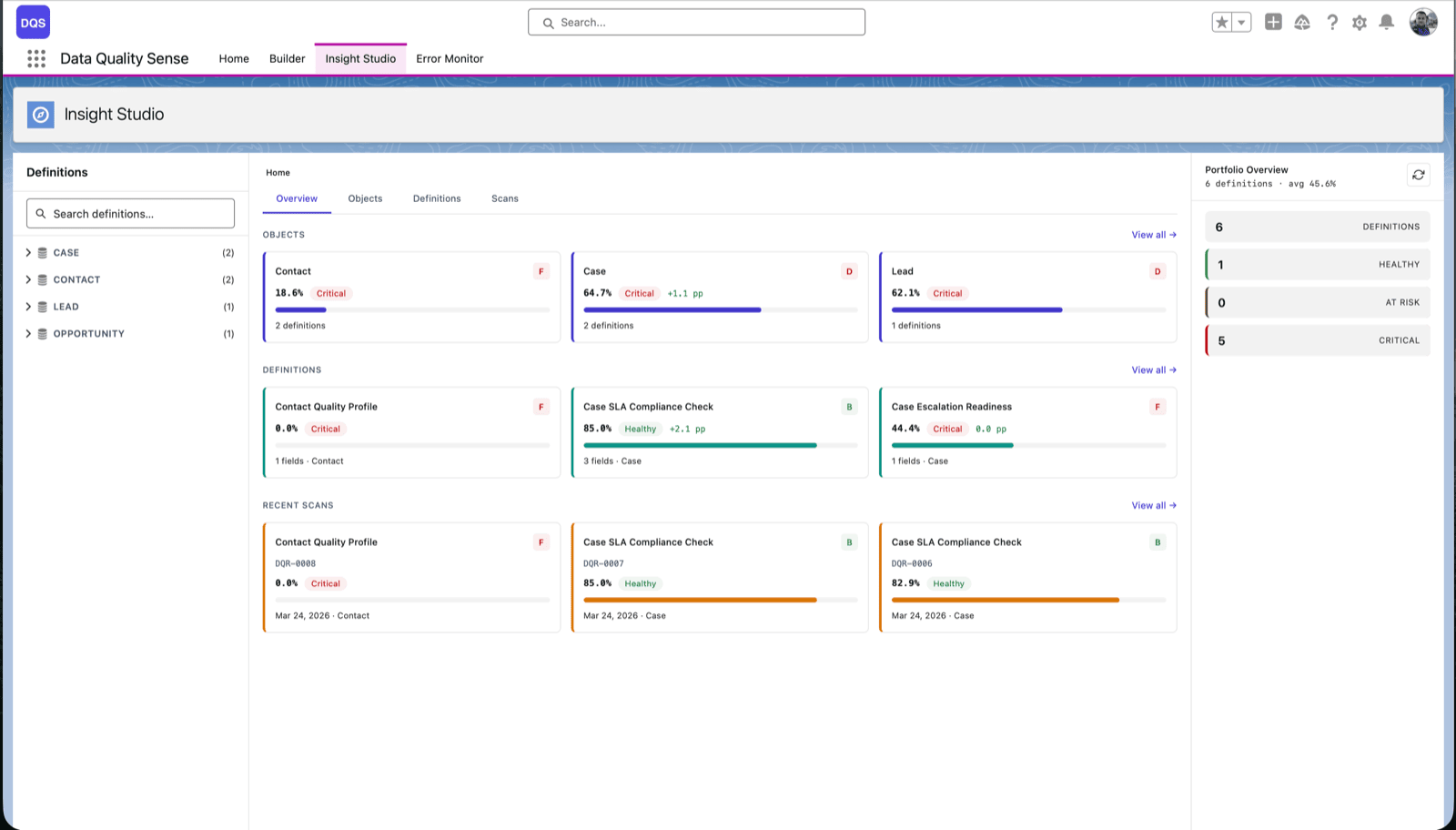
You maintain CRM hygiene with three habits: enforce a short data standard at the point of entry, run the recurring checks from the cadence table above on a schedule with named owners, and monitor the results so slippage shows up as a number instead of a surprise. Hygiene is not a project you finish. It is the combination of entry discipline, scheduled review, and visible measurement.
The rest of this article covers the second and third habits in detail. The ownership model below is what keeps them running.
Who owns which cadence
A schedule without named owners is a wish list. Assign each row of the table to a role, not a person, so the cadence survives turnover.
CRM admin owns the technical, high-frequency checks: weekly duplicate review, monthly validity checks, quarterly picklist and formatting consistency. These are the checks that need someone comfortable in setup, merge tools, and field configuration.
Sales ops owns the checks tied to revenue motion: monthly completeness on the fields that drive routing and reporting, quarterly freshness reviews, quarterly ownership cleanup. Ops feels the pain of bad data first, in broken dashboards and misrouted leads, so ops has the motivation to keep it clean.
Reps own their own records at the point of entry. They are not running audits, but they are the source of most new data. A short, enforced standard (fill these five fields, use the picklist, do not create a new account without searching first) prevents more mess than any cleanup catches. Give reps a fast way to see and fix their own flagged records rather than making cleanup feel like punishment.
The RevOps or data owner runs the pre-planning audit and owns the overall schedule. This is the person who makes sure the weekly and monthly checks are actually happening and steps in when a cadence starts slipping.
The pattern: high-frequency technical work to the admin, revenue-tied work to ops, entry-point discipline to reps, oversight to the data owner. Write these assignments down. An owner named in a document is an owner who can be asked why the check did not run.
Automating the boring 80 percent
Most of the schedule above is repetitive detection work: scan the same fields, on the same objects, on the same rhythm, and surface what broke. That is the part to automate. Manual audits should be reserved for judgment calls (is this record worth keeping, should these two accounts really merge), not for the mechanical work of finding the problems in the first place.
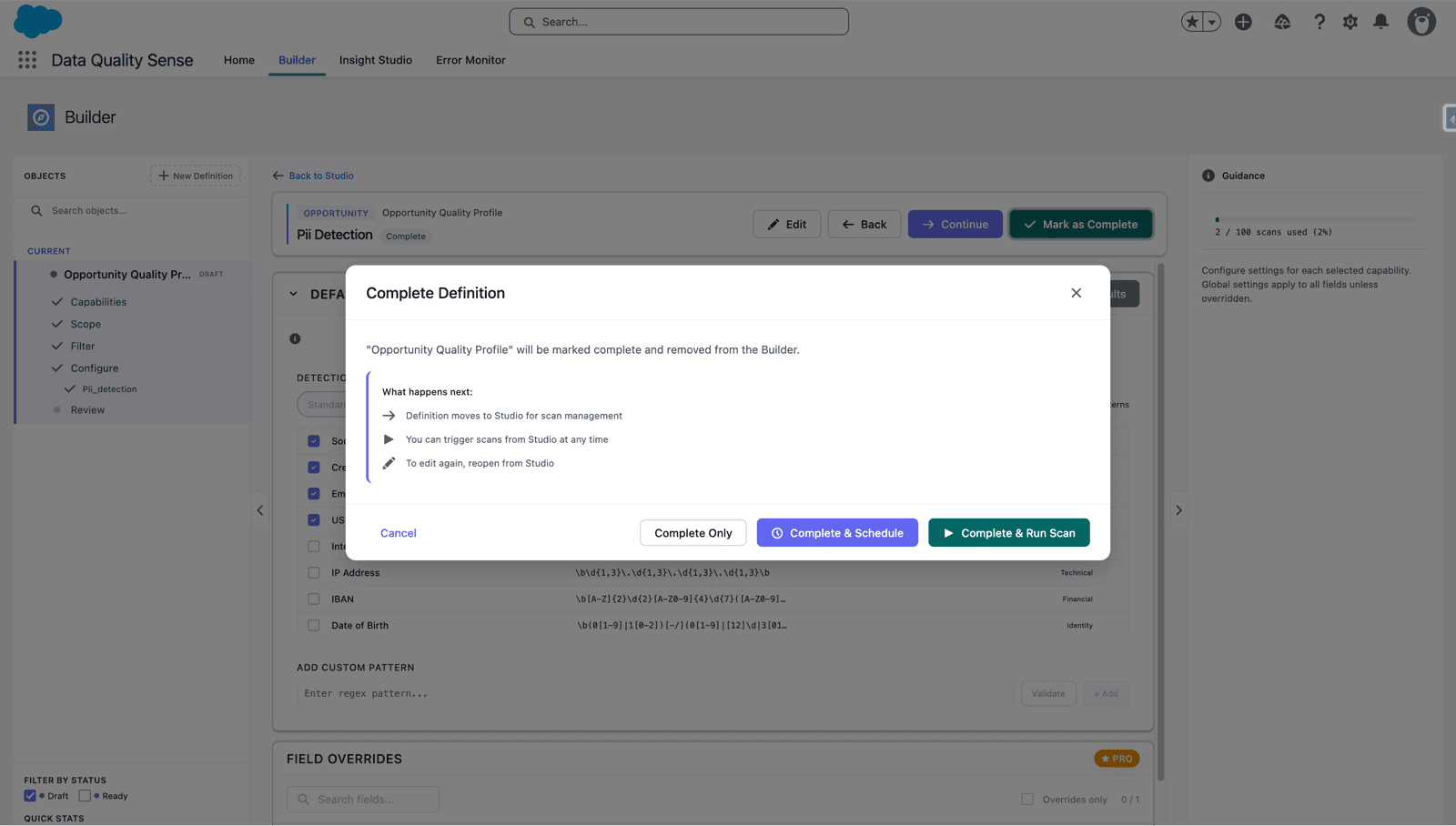
This is where scheduled scanning changes the economics of the whole cadence. Instead of an admin remembering to run a weekly duplicate check, a scan runs on a fixed schedule and reports what it found. The weekly, monthly, and quarterly rows of the table become configured jobs rather than calendar reminders someone has to honor.
Data Quality Sense (DQS) is a Salesforce-native tool built for exactly this detection layer. You define a scan against any object and its fields, set thresholds per field, and schedule it. DQS runs the scan in batches and reports what it found across each dimension: completeness, validity, uniqueness, timeliness (shown in-product as Data Freshness), and consistency. To be clear about the division of labor: DQS detects and reports, it does not silently fix, merge, or delete records for you. The judgment stays with your team. What DQS removes is the manual effort of finding the problems every week.
Scheduled scans map cleanly onto the cadence table. Point a weekly scheduled scan at your Lead, Contact, and Account uniqueness checks. Point a monthly scan at completeness on your revenue-critical fields. Point a quarterly scan at freshness and consistency. Each scheduled scan shows a “next run” countdown, so the whole team can see the cadence is live and when the next pass lands. When a scan finishes, DQS can create Tasks on the impacted records and post Chatter messages, so the detection hands off directly to the person who owns the fix. For more on setting these up, see Running scans and Measuring data quality.
Automating detection does not remove people from the loop. It moves them up the stack. Reps and ops stop hunting for problems and spend their time on the decisions that need a human: which stale account to revive, which duplicate is the real record, which blank field actually matters this quarter.
Signs your cadence is too slow
Even a good schedule drifts. Watch for these signals that your frequencies need to tighten.
Reports stop matching. When two people pull the same pipeline number and get different answers, duplicates or stale stages are usually the cause, and your uniqueness or freshness cadence is lagging behind reality.
Reps complain about duplicates. If salespeople are manually flagging duplicate accounts and contacts to you, your weekly check is either not running or not catching enough. The reps became your duplicate detection, which is the most expensive way to run it.
Cleanup feels like a project again. The clearest signal. If your next scheduled check produces an intimidating backlog instead of a short list, the cadence is too slow. Tighten the frequency until each pass is small again.
Forecast confidence drops. When leadership starts adding mental discount factors to the CRM numbers because they do not trust them, the data has decayed past the point your audit cadence is catching. Move the full audit earlier in the planning cycle, and lean harder on the weekly and monthly checks that keep it from getting there.
The point of a cadence is that cleanup never gets big enough to become a project again. If it does, you have not failed at cleaning your data. You have just found evidence that the schedule needs to run a little faster. Adjust the frequency, name the owner, and let the rhythm do the work.

Michał Bajdek
Co-Founder, Data Quality Sense
Salesforce Architect and AppExchange ISV founder focused on optimizing enterprise workflows. Certified System and Identity Architect who previously built Salesforce solutions at Accenture, PwC and IBM’s Waeg.