

Key takeaways
- Two failures share the name: true hallucination (the model invents facts) and wrong-but-faithful (the model correctly reads a record that is false).
- Wrong-but-faithful is more dangerous because the answer sounds perfect, sails past review, and reaches the customer; you cannot prompt your way out of it.
- The fix is four layers: grounding and retrieval hygiene, fixing the records themselves, pre-launch data gates with ongoing scans, and evals with honest failure modes.
- Layer 2 is where CRM agents actually break: duplicates, stale records, and missing or polluted fields turn a faithful agent into a confident liar.
- Gate launches on a measurable 0-100 data quality score, rescan on a schedule, and design agents to say "I do not know" instead of guessing.
An AI agent tells a customer their contract renews in March. It renewed last March, and the account churned in April. The agent was not confused. It read a record, trusted it, and answered with total confidence. The record was just wrong.
This is the failure that keeps CRM teams up at night. Not the agent inventing a fact from nothing, but the agent reading your data faithfully and passing along whatever it finds. When the data is broken, a well-behaved agent becomes a very convincing liar.
Fixing this is not one job. It is four layers, and only some of them are about the model.
Do AI agents hallucinate?
Yes, AI agents hallucinate, but two different failures get called by the same name. A true hallucination is when the model invents something with no source in the data, like a product feature that does not exist. A wrong-but-faithful answer is when the model reads your data correctly and repeats a fact that happens to be false, like a stale renewal date or a duplicate contact. The first is a model problem. The second is a data quality problem, and it is the sneakier of the two.
The two failures you have to tell apart
True hallucination is what most people picture. The model generates a plausible sentence that has no basis in any record. Grounding and retrieval controls exist to shrink this, and they work reasonably well when set up properly.
Wrong-but-faithful is harder to catch. The agent did everything right. It retrieved the correct record, read the correct field, and reported exactly what it found. The problem is that the field held a stale value, or the record was one of three duplicates, or a free-text note contained data that should never have been there. The agent’s reasoning was flawless. Its source was rotten.
This distinction matters because the two failures have opposite fixes. You cannot prompt your way out of a stale renewal date. You cannot fine-tune a model into knowing that two Account records are the same company. When the input is wrong but the retrieval is faithful, no amount of model work saves you. You have to fix the ground the agent stands on.
Wrong-but-faithful is also more dangerous in production. A true hallucination often sounds slightly off, and a careful reviewer catches it. A wrong-but-faithful answer sounds perfect, because it is internally consistent with a real record. It sails past review and reaches the customer.
How do you stop AI agents from hallucinating?
You stop AI agents from hallucinating by working in four layers: fix grounding and retrieval so the model answers from your data instead of guessing, fix the underlying records so faithful retrieval returns true facts, put data quality gates in front of launch and keep scanning after it, and build evals plus honest failure modes so the agent says “I do not know” instead of inventing an answer. The first layer handles true hallucination. The middle two handle wrong-but-faithful, which is where most CRM agents actually break. The last layer catches what the first three miss.
Here is the checklist in order.

Layer 1: grounding and retrieval hygiene
Grounding forces the model to answer from retrieved records rather than from its training memory. This is your defense against true hallucination. When a model has to cite a source it actually pulled, it invents far less.
In the Salesforce world, this is the job of the platform’s built-in grounding and safety layer, sometimes described under the Einstein Trust Layer. At a high level, it keeps the agent’s answers tied to your Salesforce data and applies safety controls around what the model sees and returns.
Retrieval hygiene is the part teams forget. Grounding only helps if the agent retrieves the right records. Check three things. First, scope: does the agent have access to the records it needs, and none that it should not? Second, relevance: does your retrieval return the single correct record, or a pile of near-matches the model has to guess between? Third, freshness of the index: if you use a vector store or search index, how stale is it compared to the live records?
Layer 1 gets you a model that answers from your data. It does nothing about whether that data is true. That is the next layer, and for CRM agents it is where the real trouble lives.
Layer 2: the data itself
This is the layer everyone skips and everyone pays for. A perfectly grounded agent retrieving a perfectly wrong record produces a perfectly confident lie.
Three data problems cause most wrong-but-faithful answers.
Duplicates are the worst offender. When the same customer exists as three Account records, the agent has no way to know which one is current. It picks one, reads it, and answers. Half the time it reads the abandoned record with the old address and the closed cases. The agent is faithful. The record set is a trap.
Stale records are the second. A field that was true two years ago is now a wrong answer waiting to be read. Renewal dates, entitlements, job titles, and account owners all decay. The agent cannot tell a fresh value from a fossil.
Missing and malformed data is the third. A blank field becomes an unhelpful “I have no record of that.” A phone number stored in a notes field instead of the phone field never gets retrieved. A note with mixed languages or pasted boilerplate pollutes what the model reads.
Layer 2 is not a model task or a prompt task. It is a data task. You have to know which records are duplicated, stale, incomplete, or polluted before you can trust an agent to read them. That means measuring the data, which is Layer 3.
Layer 3: pre-launch data gates and ongoing scans
You cannot gate what you cannot measure. Before an agent goes live, scan the objects and fields it will read, and set a bar it has to clear. After it goes live, keep scanning, because data decays and new records arrive dirty.
This is where Data Quality Sense (DQS) fits. DQS is a Salesforce-native tool that defines, scans, and scores data quality across any SObject, and it detects and reports problems rather than editing your records. For agent readiness, its AI Readiness capability group maps directly onto the Layer 2 failures.
| Failure in Layer 2 | DQS AI Readiness capability | What it surfaces |
|---|---|---|
| Sensitive data in free text | PII Safety (PII Detection) | SSNs, credit cards, emails, and phones sitting in string and text-area fields |
| Sparse or empty grounding text | Content Density (Token Analysis) | Token counts and field utilization across the text fields the agent reads |
| Polluted, boilerplate-heavy notes | Content Hygiene (Noise Detection) | Noise patterns and boilerplate, with the record counts affected |
| Mixed-language content that confuses the model | Language Quality | Records mixing languages in ways that hurt model performance |
The operational dimensions matter here too. Completeness surfaces the blank fields that produce “I do not know,” Uniqueness surfaces the duplicate records that cause contradictions, and Timeliness, shown in-product as Data Freshness, surfaces the stale records that produce confidently wrong facts. DQS rolls these into a single 0 to 100 score so you can set a launch threshold and see whether the data clears it.
Two DQS facts make this a gate and not a one-time chore. Scans are schedulable, so you can rescan the agent’s data on a cadence and watch the score trend. And when a scan finds violations, DQS can create Tasks and post Chatter messages to route the fix to a human owner, since it reports and assigns rather than auto-correcting.
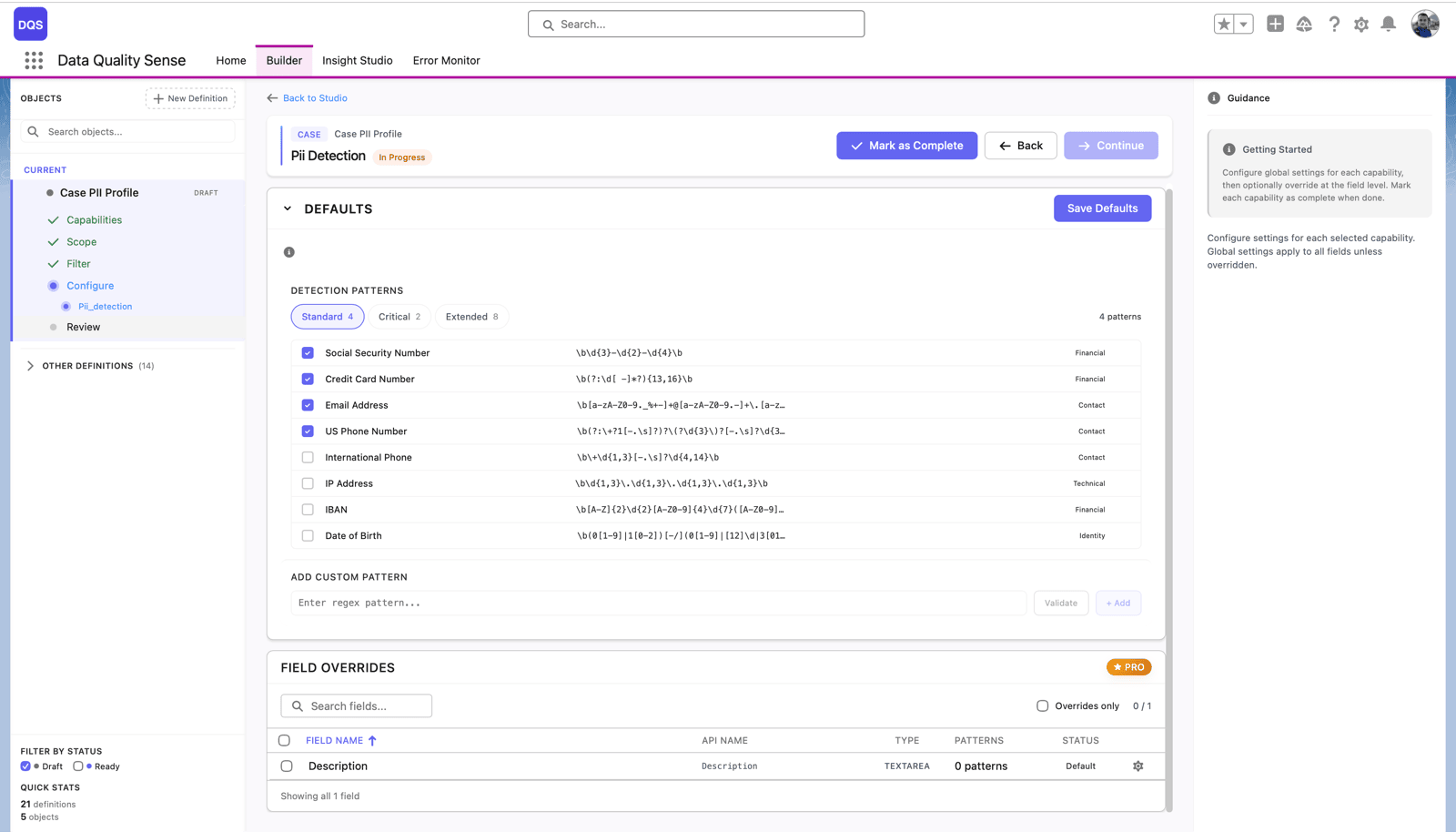
One honest limit: DQS tells you what is wrong and where, and it can route the work. It does not merge your duplicates or rewrite your fields for you. A person still does the cleanup. That is the point of a gate. It makes the debt visible and measurable before the agent inherits it.
Layer 4: evals and honest failure modes
The first three layers reduce bad answers. The fourth layer catches the ones that slip through and makes the agent fail gracefully when they do.
Build an eval set from real questions your agent will face, including the ugly ones: the customer with two accounts, the expired entitlement, the record with a blank critical field. Run it before launch and after every change. An agent that scores well on curated demo questions and poorly on messy real ones is not ready, no matter how good the demo looked.
Then design for honest failure. An agent that says “I do not have a confident answer, let me route you to a person” beats an agent that invents a renewal date every time. Set confidence thresholds and fallback paths so low-certainty cases escalate instead of guessing. “I do not know” is a feature. Confident nonsense is the bug.
Where to start
Work the layers in order, but weight your effort by where CRM agents actually fail. True hallucination gets the headlines. Wrong-but-faithful gets the escalations.
- Layer 1 stops the model from inventing facts. Grounding and retrieval hygiene handle this.
- Layer 2 is the real CRM problem: duplicates, stale records, and polluted fields turn a faithful agent into a confident liar.
- Layer 3 measures Layer 2 and gates on it, before launch and on a schedule after.
- Layer 4 catches the rest and makes the agent admit uncertainty instead of faking it.
If you are debugging an agent that already gives wrong answers, start with the symptom-to-cause map in Why Agentforce Agents Give Wrong Answers. If you are planning a deployment and want the readiness path end to end, start with the Agentforce data quality preparation guide.
The model is rarely the reason your agent lies. The data usually is. Measure it before you ship, and the confident lies stop.

Artur Kolasa
Co-Founder, Data Quality Sense
Salesforce Certified Technical Architect helping global enterprises turn business goals into scalable Salesforce strategies. A decade of delivery and architecture leadership across Accenture, PwC, IBM’s Waeg and Publicis Sapient.